
A check-in lacks purpose
A timestamp or location pin does not explain which customer was assigned, what work was expected, or what happened next.
Customer visit tracking
Assign customers, record the visit outcome, notes, and next action, and review available GPS and work-session context without treating location as proof by itself.
Overview
Customer visit tracking software records who was assigned to a customer, what happened during the visit, and what must happen next. Scootee stores the visit outcome, notes, next action, and available GPS or geofence context with the employee’s work session. Location supports review; it does not prove a completed visit or sale by itself.
What a visit record contains
The useful record is the assigned customer, visit time, outcome, notes and follow-up. When available, GPS and work-session context support review. Location by itself does not prove the meeting or a sale.
Who was assigned and which site or account the visit concerns.
What happened, with notes the next reviewer can understand.
Who follows up and what needs to happen next.
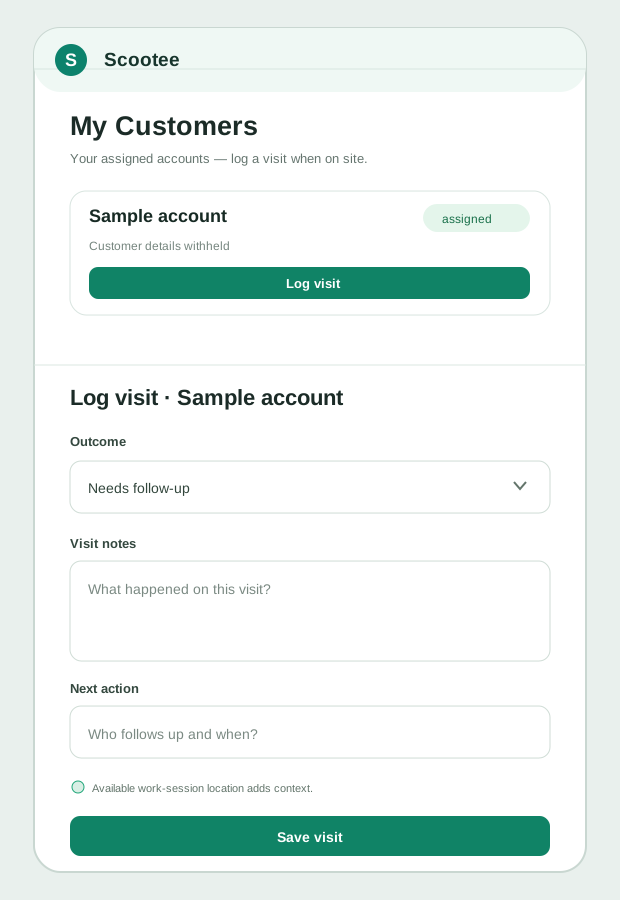
The form is reconstructed from product source with fictional data. Scootee does not publish employee trails or customer locations as marketing evidence.
PRODUCT WORKFLOW / ILLUSTRATIVE
What the team reviewsThe operational friction
A timestamp or location pin does not explain which customer was assigned, what work was expected, or what happened next.
Employees reconstruct the day from memory while managers chase updates through calls and personal messages.
The route, distance, receipts, tasks, and visit record are reviewed in different systems with no stable relationship.
How it works
Follow the employee action, the available supporting records and the review decision. Confirm your configuration in a demo.
Make the customer or site available to the responsible employee inside the organization scope.
The employee starts the explicit field workflow that can provide time and available route context.
Select the assigned customer and save the outcome, notes, next action, and current location context.
Update the related task and keep supported expenses, requests, and staff conversation connected to the customer or field day.
Managers inspect the visit with its available timing, route, customer, work, and exception context.
Fictional workflow example
Customer visit tracking should preserve what happened and what comes next, not simply show that a phone was nearby.
Fictional customer and visit. Location context supports review; it does not independently prove a completed sale or task.
Product capability index
Control which customer records are available to each employee in the field workflow.
Preserve the customer-specific result, notes, and follow-up instead of relying only on an employee location trail.
Review the visit alongside the explicit work session and available recorded route evidence.
Connect assigned work, status, notes, attachments, and other supported evidence to the working day.
Review available same-day or business-trip expense records alongside the visit. A direct expense-claim-to-visit relationship is not assumed.
Keep internal follow-through attached to the customer record rather than a personal messaging thread.
Pilot success measures
Questions for your evaluation
Questions / answers
No. GPS can provide useful time and route context, but it does not explain the purpose or result of the visit. Scootee combines available location evidence with the assigned customer, visit activity, tasks, expenses, and follow-through.
Scootee includes customer records, assignments, visit workflows, tasks, and customer-level staff conversations for field execution. Opportunity pipelines, quotations, campaigns, and revenue forecasting should be evaluated separately.
Yes. The customer or site can represent a service location, inspection point, dealer, branch, or other assigned place. The exact fields and evidence required should be mapped during implementation.
Eligible mobile records can queue on the device and synchronize after connectivity returns. Buyers should test the exact visit, attachment, location, and conflict behavior on representative devices during rollout.
Bring one real workflow
Bring one example of your current process. Check employee capture, office review, exceptions and the handoff your team needs.