
Visit reports are written from memory
Reps reconstruct the day later, making customer coverage and travel hard to verify.
Field sales tracking
Assign customers, record visit outcomes and next actions, and review the available session, route, task, and expense context behind the day.
Overview
A field sales app helps reps see assigned customers, record visit outcomes and next actions, and keep the day’s work accessible to managers. Scootee keeps visits with their available work-session, route and task context; managers can review same-day expenses separately. It supports field execution and follow-up; it is not a full opportunity, quoting or forecasting CRM.
Inside the visit workflow
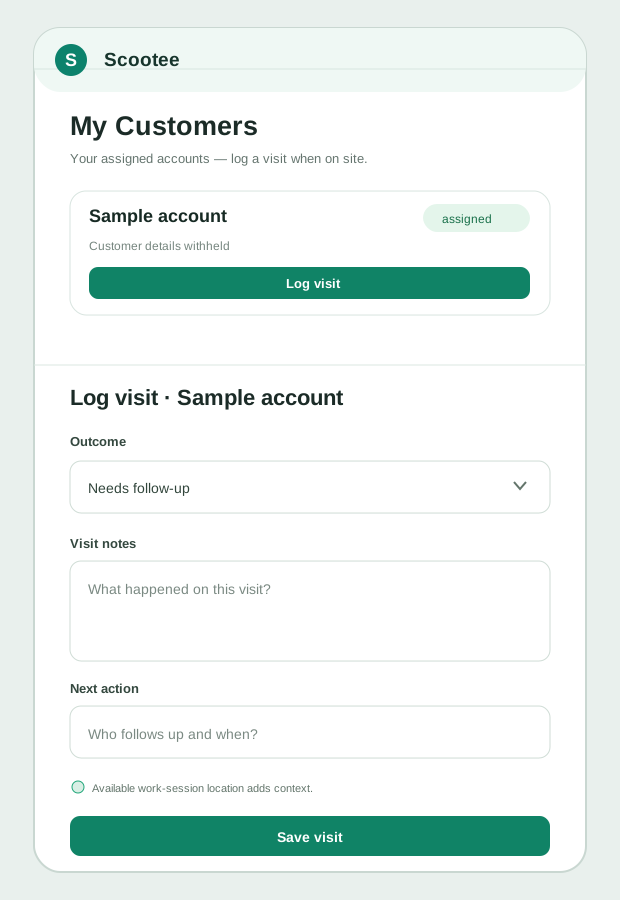
Scootee records the assigned customer, visit outcome, notes and next action. Available session and location context helps a manager review the field day, but a map pin alone cannot establish what happened in the meeting.
The customer is available to the responsible employee within the organization scope.
The employee records an outcome and notes after the visit.
A next action makes the record usable for the manager and team.
The visit form is reconstructed from product source with fictional data. No customer names, addresses, route traces or visit outcomes are published.
PRODUCT WORKFLOW / ILLUSTRATIVE
What the team reviewsThe operational friction
Reps reconstruct the day later, making customer coverage and travel hard to verify.
Assignments, directions, visit notes, tasks, and team messages live in separate tools.
A location trail does not explain whether the intended customer was visited or the required work was completed.
How it works
Follow the employee action, the available supporting records and the review decision. Confirm your configuration in a demo.
Maintain customer records and assign them to the responsible field employees.
Give the employee a clear work list containing customers, tasks, requests, and current priorities.
Select the assigned customer, record the visit outcome and notes, and add the next action while the session provides available time and location context.
Update tasks, add expenses or evidence, use customer-level staff conversation, and review the next action from the portal.
Fictional workflow example
Give the sales manager a customer, an outcome, and a next action alongside the available field record.
Fictional workflow example, not a customer result or a CRM opportunity forecast. Scootee’s visit record includes outcome, notes, and next-action fields.
Product capability index
Assign customer records to employees and control which records appear in the mobile workflow.
Store the visit result, notes, and follow-up against the assigned customer with available time and geofence context.
Keep internal conversations tied to the customer instead of losing decisions in personal messaging threads.
Show the employee what must be completed and let managers see status and exceptions.
Link the cost of field sales activity to routes, trips, receipts, categories, and approvals.
Use team dashboards, session lists, maps, timelines, and reports to review execution.
Pilot success measures
Questions for your evaluation
Questions / answers
Depending on permission scope, managers can review employee sessions, route history, customer assignments, visit activity, tasks, expenses, requests, and operational dashboards.
Scootee includes customer records, employee assignments, visit workflows, and customer-level staff conversations for field execution. Buyers needing a full opportunity, quotation, campaign, or revenue-forecasting CRM should confirm integration and workflow requirements during the demo.
The native field app includes offline queues for supported field records and synchronizes after connectivity returns. The exact workflow should be tested on representative devices and territories during rollout.
Yes. Customer or site assignments, sessions, tasks, route history, expenses, and internal messages also fit service, inspection, maintenance, and audit workflows.
Bring one real workflow
Bring one example of your current process. Check employee capture, office review, exceptions and the handoff your team needs.