
Native field employee app
What can a field employee do in Scootee’s mobile app?
Scootee has native Android and iOS apps for field work. Android has the widest workforce coverage and offline queue; iOS covers tracking, journey history, work, claims and profile surfaces. Store availability and release coverage are confirmed for each deployment.
Short answer
What does the Scootee field employee app do?
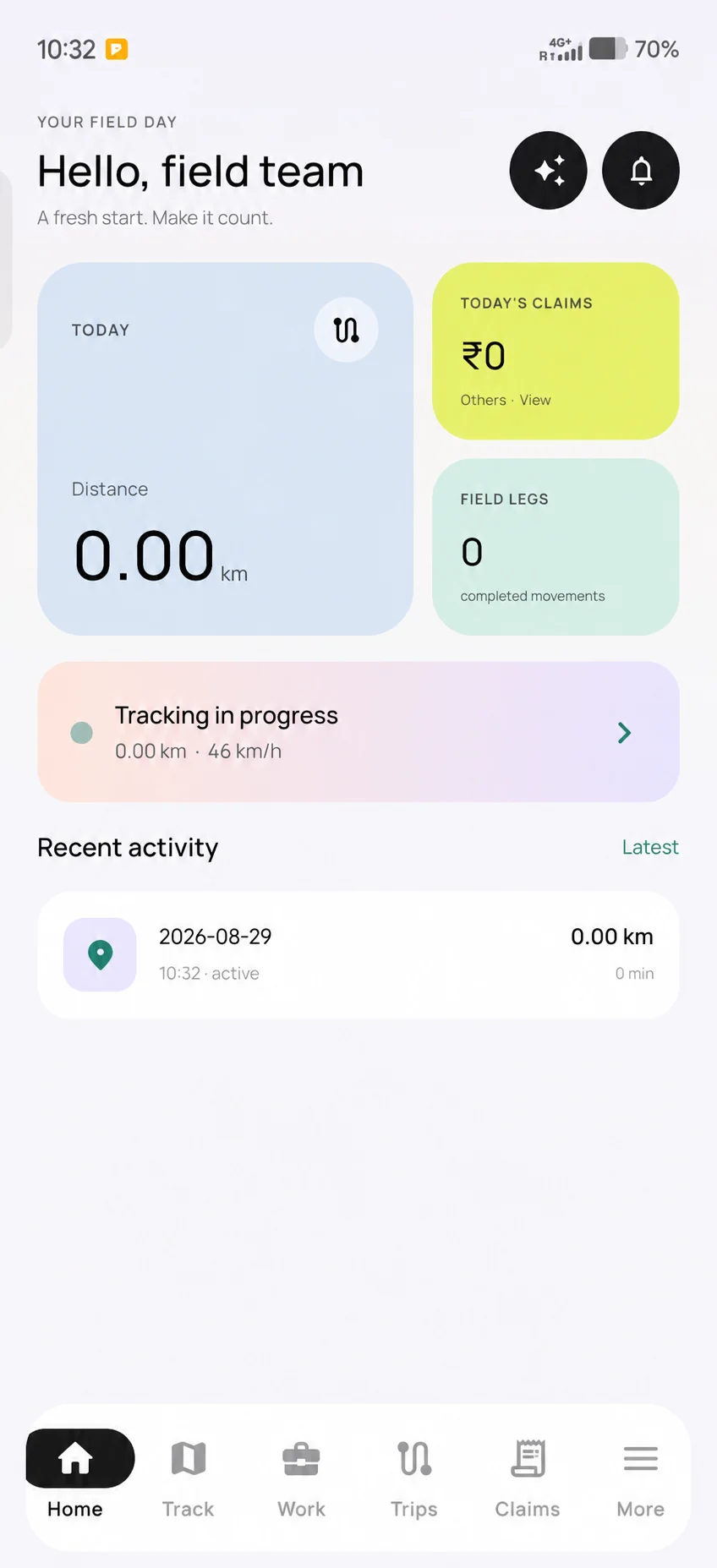
The Scootee app is the phone app field staff use through the working day. They start and end a work session, see assigned customers and tasks, punch attendance, add expense claims with receipts and raise requests. The Android app has the widest coverage and queues most records offline; the iOS app covers the core field day.
Platform depth
Which employee workflows are available on each mobile platform?
What does the Android app cover?
The Android app covers work sessions and tracking, journey history, expenses, attendance, leave and pay views, tasks, timesheets, business trips, assigned customers, forms, requests, team chat, company updates and notifications.
What does the iOS app cover?
The iOS app has Today, Journey, Work, Claims and More tabs, with screens for tracking, history, attendance, tasks, timesheet, customers, business trips, claims, requests and profile. It is not feature-identical to Android, so test each required workflow on iPhone.
How does a work session control tracking?
Location capture begins through an explicit session action and remains subject to the employee’s permissions, device settings, operating-system behavior and release configuration.
What can happen during temporary connectivity loss?
Eligible records queue locally and synchronize after connectivity returns. Coverage differs by platform and record type, so each required workflow needs its own acceptance test.
Step by step
How does a field employee use the app through the day, step by step?
Sign in and allow location
The employee signs in, reads the location-tracking disclosure and grants location permission for work sessions.
Punch attendance
On plans with attendance, the employee punches in with a fresh GPS reading. If the branch has a geofence and the employee’s policy requires it, a punch outside the radius is refused.
Start the work session
Tracking starts with the session. On Android a notification stays visible while the session records location and distance.
Work through customers, tasks and claims
The employee logs each visit outcome and next action, moves tasks to in progress or done, and adds claims with receipt photos.
End the session and sync
The employee ends the session. Queued records upload when the phone is online, and the journey appears in the employee’s history.
Which records work offline in low-network areas?
On Android, the app stores records on the phone and a background sync uploads them when a network is available. On iOS, offline storage currently covers sessions, location points and expenses. Customer visits need a connection on both platforms in the current release.
- Android: location points, sessions and trips, expenses and receipts, attendance punches, task progress, requests with comments and attachments, leave and business-trip actions and team chat.
- iOS: sessions, location points and expenses.
How do you stop Android battery savers from killing tracking?
Many Android phones sold in India stop background apps to save battery, which can cut a session short. The Scootee Android settings include Battery optimisation and Auto-start in background shortcuts that open the right system screen on Xiaomi, Oppo, Vivo, iQOO, Honor, Huawei, Samsung and Asus phones. The app does not change these settings itself; set them with each employee during onboarding.
A Battery Saver tracking mode records less often and works out road distance when the trip stops, which suits longer A-to-B journeys.
What does the app tell employees before tracking starts?
Before asking for location permission, the Android app shows a location-tracking disclosure that explains data is collected while a tracking session is active and shared with the employer. The employee can continue or exit the app. The iOS app uses onboarding text and the standard system permission messages. Your own employee notice and acknowledgement record should sit alongside these screens.
What should an implementation team verify on real devices?
- Verify sign-in, session start and end, permission denial, background behavior and reconnect on the intended Android and iOS versions.
- Test on the low-cost Android models your staff actually carry, with battery saver on and with mobile data off.
- Test each required offline-aware record separately, including any receipt or photo upload, instead of accepting a blanket offline claim.
- Confirm store or managed-distribution availability, release identity, device policy and support ownership before employee rollout.
- Compare the mobile submission state with the manager portal so queued, uploaded, reviewed and completed records are not conflated.
What changes when field records start on the employee’s phone?
- Let employees create field records close to the work instead of reconstructing the day later.
- Preserve supported work during temporary connectivity loss while making sync state visible.
- Give office teams structured records once synchronization completes without claiming platform parity that has not been verified.
Continue the evaluation
Where should you evaluate the full mobile-to-office workflow?
FAQ
Native field employee app questions
Eligible records queue during temporary connectivity loss and synchronize later. Android queues most field records; iOS currently queues sessions, location points and expenses. Customer visits need a connection. Test the workflows you need on each platform.
Allow location for work sessions, then use the app’s Battery optimisation and Auto-start in background shortcuts to open the system screens on phones such as Xiaomi, Oppo, Vivo and Samsung. Check these during onboarding, because phone makers change them between versions.
The tracking workflow records location inside a work session the employee starts and ends. Attendance punches also take a location reading at the moment of the punch. Verify the behavior on the deployed release.
No. Android has broader workforce coverage and a wider offline queue. iOS covers tracking, history, work, claims and profile surfaces. Confirm the required workflow on each platform before rollout.
Store availability, managed distribution, release identity, supported operating-system versions and customer device policy must be confirmed for the planned deployment.
Contact Us
Start building with Scootee
Tell us how your field team works. We will show you recorded distance and its calculation method, customer visits, and expense review in Scootee.
Contact Us