
The time record and field day disagree
Attendance shows one status while the employee’s work session, visit, or task record shows another.
Attendance and workforce
Record mobile attendance, manage shifts and rosters, review correction requests and leave, and prepare the period for payroll processing.
Overview
A GPS time clock app helps field employees record supported time actions away from one office device, with location checks where configured. Scootee connects mobile attendance to shifts, rosters, correction requests, leave and working-time review. Country-specific payroll, tax filing and bank payment remain separate implementation decisions.
Inside attendance review
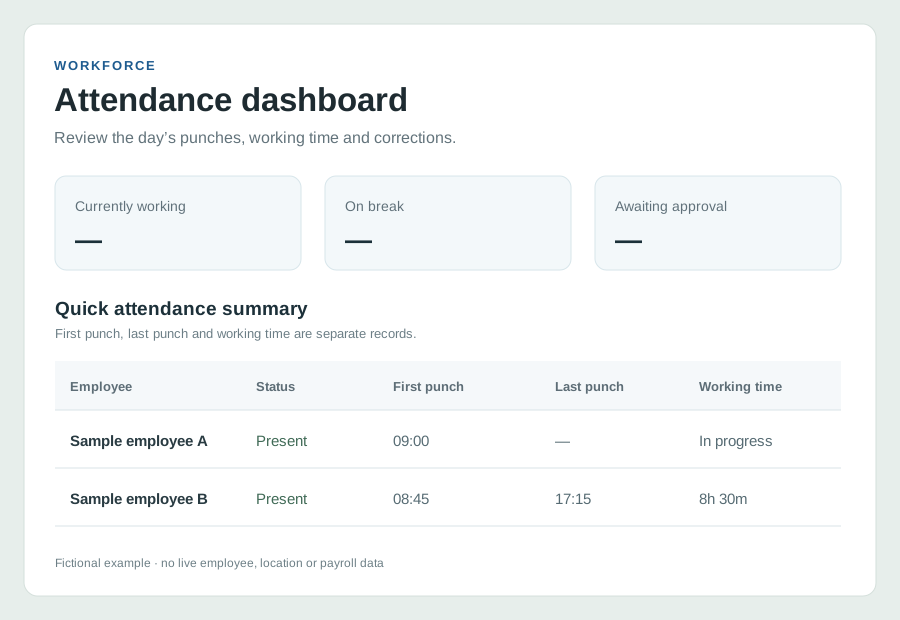
The workforce dashboard separates currently working employees, attendance punches, working time and awaiting approvals. An authorized reviewer can inspect exceptions before the period is processed.
Capture supported time actions and show the resulting daily attendance state.
Review missed punches and correction requests in a controlled workflow.
Keep attendance evidence separate from any country-specific payroll, filing or payment step.
This is a source-based reconstruction with fictional records. It deliberately contains no payroll screen, salary amount or claim of US tax filing.
PRODUCT WORKFLOW / ILLUSTRATIVE
What the team reviewsThe operational friction
Attendance shows one status while the employee’s work session, visit, or task record shows another.
Late punches, missed actions, and leave adjustments are resolved in chats with no consistent approval history.
HR re-keys days, hours, leave, salary inputs, and travel every period.
How it works
Follow the employee action, the available supporting records and the review decision. Confirm your configuration in a demo.
Configure branches, departments, designations, shifts, week-offs, holidays, and employee assignments.
Employees use the supported mobile attendance flow. Configured geofence checks can be enforced where the organization has provided a valid attendance location.
Authorized reviewers handle correction requests, bulk adjustments, and leave decisions with a recorded reason or workflow history.
Use attendance, timesheets, leave, salary structures, arrears, loans, and payroll groups in payroll processing.
Product capability index
Create working patterns and assign them to employees across branches and departments.
Review daily punches, branch records, muster, shift-wise, working-hours, and leave-taken reports.
Control attendance actions, document bulk adjustments, and route changes through approvals.
Create leave, manage balances and assignments, configure holidays, and track request decisions.
Maintain effective-dated employee salary structures and validate missing assignments before payroll.
Organize payroll groups and periods, then handle process, finalized records, arrears, loans, and exports.
Pilot success measures
Questions for your evaluation
Questions / answers
Field employees work across changing locations and may have customer visits, travel, tasks, and connectivity gaps. A field attendance system should combine time actions with contextual work records and a clear exception process rather than depend on one office device.
Yes. The workforce module includes shifts, shift assignments, rosters, week-offs, holidays, branches, departments, and reporting for distributed work patterns.
Scootee includes attendance permissions, bulk adjustments, approval workflows, activity logs, and report surfaces so corrections can be handled inside the tenant workflow.
Scootee includes salary structures, payroll groups, payroll periods, processing, finalized records, arrears, and loans. Statutory, banking, and country-specific requirements should be mapped during implementation before production use.
Bring one real workflow
Bring one example of your current process. Check employee capture, office review, exceptions and the handoff your team needs.